- Process/Application Layer
- Host-to-Host/Transport Layer
- Internet Layer
- Network Access/Link Layer
- Network Access Layer
This layer corresponds to the combination of the Data Link Layer and Physical Layer of the OSI model. It looks out for hardware addressing and the protocols present in this layer allows for the physical transmission of data.
We just talked about ARP being a protocol of Internet layer, but there is a conflict about declaring it as a protocol of Internet Layer or Network access layer. It is described as residing in layer 3, being encapsulated by layer 2 protocols.
- Internet Layer
This layer parallels the functions of OSI's Network layer. It defines the protocols which are responsible for the logical transmission of data over the entire network. The main protocols residing at this layer are :
- IP - stands for Internet Protocol and it is responsible for delivering packets from the source host to the destination host by looking at the IP addresses in the packet headers. IP has 2 versions:
IPv4 and IPv6. IPv4 is the one that most of the websites are using currently. But IPv6 is growing as the number of IPv4 addresses are limited in number when compared to the number of users. - ICMP - stands for Internet Control Message Protocol. It is encapsulated within IP datagrams and is responsible for providing hosts with information about network problems.
- ARP - stands for Address Resolution Protocol. Its job is to find the hardware address of a host from a known IP address. ARP has several types: Reverse ARP, Proxy ARP, Gratuitous ARP and Inverse ARP.
- IP - stands for Internet Protocol and it is responsible for delivering packets from the source host to the destination host by looking at the IP addresses in the packet headers. IP has 2 versions:
- Host-to-Host Layer
This layer is analogous to the transport layer of the OSI model. It is responsible for end-to-end communication and error-free delivery of data. It shields the upper-layer applications from the complexities of data. The two main protocols present in this layer are :
- Transmission Control Protocol (TCP) - It is known to provide reliable and error-free communication between end systems. It performs sequencing and segmentation of data. It also has an acknowledgment feature and controls the flow of the data through the flow control mechanism. It is a very effective protocol but has a lot of overhead due to such features. Increased overhead leads to increased cost.
- User Datagram Protocol (UDP) - On the other hand does not provide any such features. It is the go-to protocol if your application does not require reliable transport as it is very cost-effective. Unlike TCP, which is connection-oriented protocol, UDP is connectionless.
- Process Layer
This layer performs the functions of the top three layers of the OSI model: Application, Presentation and Session Layer. It is responsible for node-to-node communication and controls user-interface specifications. Some of the protocols present in this layer are HTTP, HTTPS, FTP, TFTP, Telnet, SSH, SMTP, SNMP, NTP, DNS, DHCP, NFS, X Window, LPD. Have a look at Protocols in Application Layer for some information about these protocols. Protocols other than those present in the linked article are :
- HTTP and HTTPS - HTTP stands for Hypertext transfer protocol. It is used by the World Wide Web to manage communications between web browsers and servers. HTTPS stands for HTTP-Secure. It is a combination of HTTP with SSL(Secure Socket Layer). It is efficient in cases where the browser need to fill out forms, sign in, authenticate and carry out bank transactions.
- SSH - SSH stands for Secure Shell. It is a terminal emulations software similar to Telnet. The reason SSH is more preferred is because of its ability to maintain an encrypted connection. It sets up a secure session over a TCP/IP connection.
- NTP - NTP stands for Network Time Protocol. It is used to synchronize the clocks on our computer to one standard time source. It is very useful in situations like bank transactions. Assume the following situation without the presence of NTP. Suppose you carry out a transaction, where your computer reads the time at 2:30 PM while the server records it at 2:28 PM. The server can crash very badly if it's out of sync.

| Layer | Name of the Layer | Protocols in the Layer |
|---|---|---|
| Layer 7 | Application Layer | WWW browsers, NFS, SNMP, Telnet, HTTP, FTP |
| Layer 6 | Presentation Layer | ASCII, EBCDIC, TIFF, GIF, PICT, JPEG, MPEG, MIDI |
| Layer 5 | Session Layer | NFS, NetBios names, RPC, SQL |
| Layer 4 | Transport Layer | SPX, TCP, UDP |
| Layer 3 | Network Layer | DDP, IP, IPX |
| Layer 2 | Data Link Layer | PPP, FDDI, ATM, IEEE 802.5/ 802.2, IEEE 802.3/802.2, HDLC, Frame Relay |
| Layer 1 | Physical Layer | Ethernet, FDDI, B8ZS, V.35, V.24, RJ45 |
Data Link Layer is divided into two sub layers :
- Logical Link Control (LLC)
- Media Access Control (MAC)
The packet received from the Network layer is further divided into frames depending on the frame size of NIC(Network Interface Card). DLL also encapsulates Sender and Receiver’s MAC address in the header.
The Receiver’s MAC address is obtained by placing an ARP(Address Resolution Protocol) request onto the wire asking "Who has that IP address?" and the destination host will reply with its MAC address.

The functions of the data Link layer are :
- Framing: Framing is a function of the data link layer. It provides a way for a sender to transmit a set of bits that are meaningful to the receiver. This can be accomplished by attaching special bit patterns to the beginning and end of the frame.
- Physical addressing: After creating frames, Data link layer adds physical addresses (MAC address) of sender and/or receiver in the header of each frame.
- Error control: Data link layer provides the mechanism of error control in which it detects and retransmits damaged or lost frames.
- Flow Control: The data rate must be constant on both sides else the data may get corrupted thus , flow control coordinates that amount of data that can be sent before receiving acknowledgement.
- Access control: When a single communication channel is shared by multiple devices, MAC sub-layer of data link layer helps to determine which device has control over the channel at a given time.
* Packet in Data Link layer is referred as Frame.
** Data Link layer is handled by the NIC (Network Interface Card) and device drivers of host machines.
*** Switch & Bridge are Data Link Layer devices.
The functions of the Network layer are :
- Routing: The network layer protocols determine which route is suitable from source to destination. This function of network layer is known as routing.
- Logical Addressing: In order to identify each device on internetwork uniquely, network layer defines an addressing scheme. The sender & receiver’s IP address are placed in the header by network layer. Such an address distinguishes each device uniquely and universally.
* Segment in Network layer is referred as Packet.

** Network layer is implemented by networking devices such as routers.
- Transmission Delay
- Propagation Delay
- Queuing Delay
- Processing Delay
- Transmission Delay :
Time taken to put a packet onto link. In other words, it is simply time required to put data bits on the wire/communication medium. It depends on length of packet and bandwidth of network.
Transmission Delay = Data size / bandwidth = (L/B) second
- Propagation delay :
Time taken by the first bit to travel from sender to receiver end of the link. In other words, it is simply the time required for bits to reach the destination from the start point. Factors on which Propagation delay depends are Distance and propagation speed.
Propagation delay = distance/transmission speed = d/s
- Queuing Delay :
Queuing delay is the time a job waits in a queue until it can be executed. It depends on congestion. It is the time difference between when the packet arrived Destination and when the packet data was processed or executed. It may be caused by mainly three reasons i.e. originating switches, intermediate switches or call receiver servicing switches.

Average Queuing delay = (N-1)L/(2*R)

where N = no. of packets

      L=size of packet

      R=bandwidth
- Processing Delay :
Processing delay is the time it takes routers to process the packet header. Processing of packets helps in detecting bit-level errors that occur during transmission of a packet to the destination. Processing delays in high-speed routers are typically on the order of microseconds or less.
In simple words, it is just the time taken to process packets.
Total time or End-to-End time
= Transmission delay + Propagation delay+ Queuing delay
+ Processing delay
Accept : allow the traffic
Reject : block the traffic but reply with an “unreachable error”
Drop : block the traffic with no reply
A firewall establishes a barrier between secured internal networks and outside untrusted network, such as the Internet.

Firewalls are generally of two types: Host-based and Network-based.
- Host- based Firewalls : Host-based firewall is installed on each network node which controls each incoming and outgoing packet. It is a software application or suite of applications, comes as a part of the operating system. Host-based firewalls are needed because network firewalls cannot provide protection inside a trusted network. Host firewall protects each host from attacks and unauthorized access.
- Network-based Firewalls : Network firewall function on network level. In other words, these firewalls filter all incoming and outgoing traffic across the network. It protects the internal network by filtering the traffic using rules defined on the firewall. A Network firewall might have two or more network interface cards (NICs). A network-based firewall is usually a dedicated system with proprietary software installed.
- Segmentation and Reassembly: This layer accepts the message from the (session) layer , breaks the message into smaller units . Each of the segment produced has a header associated with it. The transport layer at the destination station reassembles the message.
- Service Point Addressing: In order to deliver the message to correct process, transport layer header includes a type of address called service point address or port address. Thus by specifying this address, transport layer makes sure that the message is delivered to the correct process.
The services provided by the transport layer :
- Connection Oriented Service: It is a three-phase process which include
– Connection Establishment
– Data Transfer
– Termination / disconnection
In this type of transmission, the receiving device sends an acknowledgement, back to the source after a packet or group of the packet is received. This type of transmission is reliable and secure. - Connection less service: It is a one-phase process and includes Data Transfer. In this type of transmission, the receiver does not acknowledge receipt of a packet. This approach allows for much faster communication between devices. Connection-oriented service is more reliable than connectionless Service.
* Data in the Transport Layer is called as Segments.
** Transport layer is operated by the Operating System. It is a part of the OS and communicates with the Application Layer by making system calls.
| IPv4 | IPv6 |
|---|---|
| IPv4 has 32-bit address length | IPv6 has 128-bit address length |
| It Supports Manual and DHCP address configuration | It supports Auto and renumbering address configuration |
| In IPv4 end to end connection integrity is Unachievable | In IPv6 end to end connection integrity is Achievable |
| It can generate 4.29x10⁹ address space | Address space of IPv6 is quite large it can produce 3.4x1038 address space |
| Security feature is dependent on application | IPSEC is inbuilt security feature in the IPv6 protocol |
| Address representation of IPv4 in decimal | Address Representation of IPv6 is in hexadecimal |
| Fragmentation performed by Sender and forwarding routers | In IPv6 fragmentation performed only by sender |
| In IPv4 Packet flow identification is not available | In IPv6 packetflow identification are Available and uses flow label field in the header |
| In IPv4 checksumfield is available | In IPv6 checksumfield is not available |
| It has broadcast Message Transmission Scheme | In IPv6 multicast and any cast message transmission scheme is available |
| In IPv4 Encryption and Authentication facility not provided | In IPv6 Encryption and Authentication are provided |
Public IP address of a system is the IP address which is used to communicate outside the network. Public IP address is basically assigned by the ISP (Internet Service Provider).
Difference between Private and Public IP address:
| PRIVATE IP ADDRESS | PUBLIC IP ADDRESS |
|---|---|
| Scope is local. | Scope is global. |
| It is used to communicate within the network. | It is used to communicate outside the network. |
| Private IP addresses of the systems connected in a network differ in a uniform manner. | Public IP may differ in uniform or non-uniform manner. |
| It works only in LAN. | It is used to get internet service. |
| It is used to load network operating system. | It is controlled by ISP. |
| It is available in free of cost. | It is not free of cost. |
| Private IP can be known by entering “ipconfig” on command prompt. | Public IP can be known by searching “what is my ip” on google. |
Range:10.0.0.0 – 10.255.255.255, |
Range: Besides private IP addresses, rest are public. |
| Example: 192.168.1.10 | Example: 17.5.7.8 |

TCP provides reliable communication with something called Positive Acknowledgement with Re-transmission(PAR). The Protocol Data Unit(PDU) of the transport layer is called a segment. Now a device using PAR resend the data unit until it receives an acknowledgement. If the data unit received at the receiver's end is damaged(It checks the data with checksum functionality of the transport layer that is used for Error Detection), then the receiver discards the segment. So the sender has to resend the data unit for which positive acknowledgement is not received. You can realize from the above mechanism that three segments are exchanged between sender(client) and receiver(server) for a reliable TCP connection to get established. Let us delve how this mechanism works :

- Step 1 (SYN) : In the first step, client wants to establish a connection with server, so it sends a segment with SYN(Synchronize Sequence Number) which informs server that client is likely to start communication and with what sequence number it starts segments with
- Step 2 (SYN + ACK): Server responds to the client request with SYN-ACK signal bits set. Acknowledgement(ACK) signifies the response of segment it received and SYN signifies with what sequence number it is likely to start the segments with
- Step 3 (ACK) : In the final part client acknowledges the response of server and they both establish a reliable connection with which they will start the actual data transfer
The steps 1, 2 establish the connection parameter (sequence number) for one direction and it is acknowledged. The steps 2, 3 establish the connection parameter (sequence number) for the other direction and it is acknowledged. With these, full-duplex communication is established.
Note - Initial sequence numbers are randomly selected while establishing connections between client and server.
Cryptography is classified into symmetric cryptography, asymmetric cryptography and hashing. Below are the description of these types.

- Symmetric key cryptography -
It involves usage of one secret key along with encryption and decryption algorithms which help in securing the contents of the message. The strength of symmetric key cryptography depends upon the number of key bits. It is relatively faster than asymmetric key cryptography. There arises a key distribution problem as the key has to be transferred from the sender to the receiver through a secure channel.

- Assymetric key cryptography -
It is also known as public-key cryptography because it involves usage of a public key along with the secret key. It solves the problem of key distribution as both parties use different keys for encryption/decryption. It is not feasible to use for decrypting bulk messages as it is very slow compared to symmetric key cryptography.

- Hashing -
It involves taking the plain-text and converting it to a hash value of fixed size by a hash function. This process ensures the integrity of the message as the hash value on both, sender's and receiver's side should match if the message is unaltered.

Application Layer protocol:-
1. TELNET:
Telnet stands for the TELecomunications NETwork. It helps in terminal emulation. It allows Telnet client to access the resources of the Telnet server. It is used for managing the files on the internet. It is used for initial set up of devices like switches. The telnet command is a command that uses the Telnet protocol to communicate with a remote device or system. Port number of telnet is 23.Command
telnet [\\RemoteServer]
\\RemoteServer   : Specifies the name of the server to which you want to connect
2. FTP:
FTP stands for file transfer protocol. It is the protocol that actually lets us transfer files.It can facilitate this between any two machines using it. But FTP is not just a protocol but it is also a program.FTP promotes sharing of files via remote computers with reliable and efficient data transfer. Port number for FTP is 20 for data and 21 for control.Command
ftp machinename
3. TFTP:
The Trivial File Transfer Protocol (TFTP) is the stripped-down, stock version of FTP, but it’s the protocol of choice if you know exactly what you want and where to find it. It's a technology for transferring files between network devices and is a simplified version of FTPCommand
tftp [ options... ] [host [port]] [-c command]
4. NFS:
It stands for network file system.It allows remote hosts to mount file systems over a network and interact with those file systems as though they are mounted locally. This enables system administrators to consolidate resources onto centralized servers on the network.Command
service nfs start
5. SMTP:
It stands for Simple Mail Transfer Protocol. It is a part of the TCP/IP protocol. Using a process called "store and forward," SMTP moves your email on and across networks. It works closely with something called the Mail Transfer Agent (MTA) to send your communication to the right computer and email inbox. Port number for SMTP is 25.Command
MAIL FROM:<[email protected]?
6. LPD:
It stands for Line Printer Daemon.It is designed for printer sharing.It is the part that receives and processes the request. A "daemon" is a server or agent.Command
lpd [ -d ] [ -l ] [ -D DebugOutputFile]
7. X window:
It defines a protocol for the writing of graphical user interface–based client/server applications. The idea is to allow a program, called a client, to run on one computer. It is primarily used in networks of interconnected mainframes.Command
Run xdm in runlevel 5
8. SNMP:
It stands for Simple Network Management Protocol. It gathers data by polling the devices onthe network from a management station at fixed or random intervals, requiring
them to disclose certain information. It is a way that servers can share information about their current state, and also a channel through which an administrate can modify pre-defined values. Port number of SNMP is 61(TCP) and 62(UDP).
Command
snmpget -mALL -v1 -cpublic snmp_agent_Ip_address sysName.0
9. DNS:
It stands for Domain Name Service. Every time you use a domain name, therefore, a DNS service must translate the name into the corresponding IP address. For example, the domain name www.abc.com might translate to 198.105.232.4.Port number for DNS is 53.
Command
ipconfig /flushdns
10. DHCP:
It stands for Dynamic Host Configuration Protocol (DHCP).It gives IP addresses to hosts.There is a lot of information a DHCP server can provide to a host when the host is registering for an IP address with the DHCP server. Port number for DHCP is 67, 68.Command
clear ip dhcp binding {address | * }
Requirement
Every host is identified by the IP address but remembering numbers is very difficult for the people and also the IP addresses are not static therefore a mapping is required to change the domain name to IP address. So DNS is used to convert the domain name of the websites to their numerical IP address.
Domain : There are various kinds of DOMAIN :
- Generic domain : .com(commercial) .edu(educational) .mil(military) .org(non profit organization) .net(similar to commercial) all these are generic domain.
- Country domain .in (india) .us .uk
- Inverse domain if we want to know what is the domain name of the website. Ip to domain name mapping.So DNS can provide both the mapping for example to find the ip addresses of geeksforgeeks.org then we have to type nslookup www.geeksforgeeks.org.
Organization of Domain
 It is very difficult to find out the IP address associated with a website because there are millions of websites and with all those websites we should be able to generate the IP address immediately,
there should not be a lot of delay for that to happen organization of database is very important.
DNS record – Domain name, IP address what is the validity?? what is the time to live ?? and all the information related to that domain name. These records are stored in a tree-like structure.
Namespace - Set of possible names, flat or hierarchical. The naming system maintains a collection of bindings of names to values – given a name, a resolution mechanism returns the corresponding value –
Name server - It is an implementation of the resolution mechanism.. DNS (Domain Name System) = Name service in Internet – Zone is an administrative unit, domain is a subtree.
Name to Address Resolution
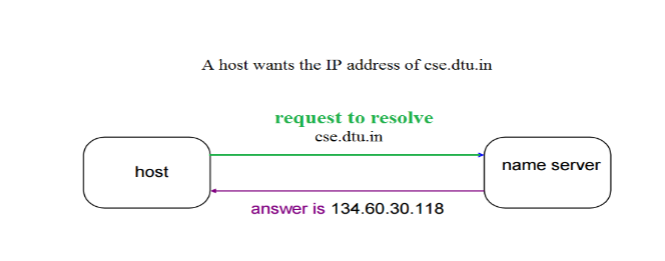 The host request the DNS name server to resolve the domain name. And the name server returns the IP address corresponding to that domain name to the host so that the host can future connect to that IP address.
Hierarchy of Name Servers Root name servers – It is contacted by name servers that can not resolve the name. It contacts authoritative name server if name mapping is not known. It then gets the mapping and return the IP address to the host.
Top level server – It is responsible for com, org, edu etc and all top level country domains like uk, fr, ca, in etc. They have info about authoritative domain servers and know names and IP addresses of each authoritative name server for the second level domains.
Authoritative name servers This is organization’s DNS server, providing authoritative hostName to IP mapping for organization servers. It can be maintained by organization or service provider. In order to reach cse.dtu.in we have to ask the root DNS server, then it will point out to the top level domain server and then to authoritative domain name server which actually contains the IP address. So the authoritative domain server will return the associative ip address.
Domain Name Server
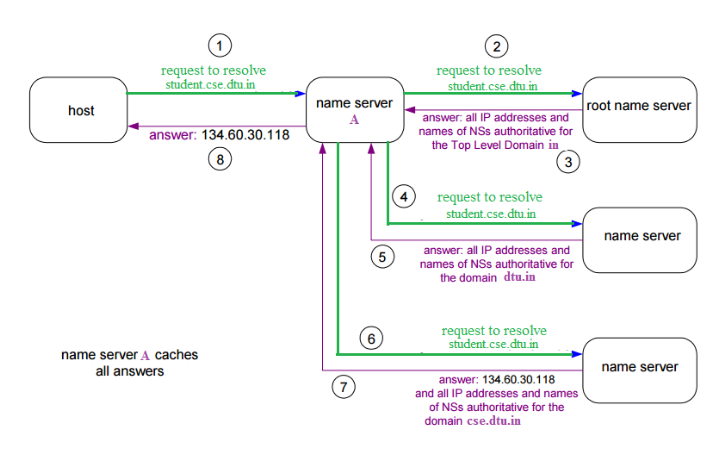 The client machine sends a request to the local name server, which , if root does not find the address in its database, sends a request to the root name server , which in turn, will route the query to an intermediate or authoritative name server. The root name server can also contain some hostName to IP address mappings . The intermediate name server always knows who the authoritative name server is. So finally the IP address is returned to the local name server which in turn returns the IP address to the host.
- URL is typed in the browser.
- If the requested object is in the browser cache and is fresh, move on to Step 8.
- DNS lookup to find the IP address of the server.
Suppose we typed www.amazon.in, then this URL is converted into corresponding IP address of the host using DNS(Domain Name System). But, it is not so. Amazon has multiple servers in multiple locations to cater to the huge volume of requests they receive per second. Thus we should let Amazon decide which server is best suited to our needs.
- Following is a summary of steps happening while DNS service is at work:
- Check browser cache: browsers maintain a cache of DNS records for some fixed duration. So, this is the first place to resolve DNS queries.
- Check OS cache: if the browser doesn't contain the record in its cache, it makes a system call to underlying Operating System to fetch the record as OS also maintains a cache of recent DNS queries.
- Router Cache: if above steps fail to get a DNS record, the search continues to your router which has its own cache
- ISP cache: if everything fails, the search moves on to your ISP. First, it tries in its cache, if not found - ISP's DNS recursive search comes into the picture. DNS lookup is again a complex process which finds the appropriate IP address from a list of many options available for websites like Google.
- Check browser cache: browsers maintain a cache of DNS records for some fixed duration. So, this is the first place to resolve DNS queries.
- Browser initiates a TCP connection with the server.
- Browser sends an HTTP request to the server.
- Server handles the incoming request
- Browsers displays the html content
- Client interaction with server
The solutions that we generally think of are
a) Round Robin
b) Assign a new request to a server that has a minimum load.
Both of the above approaches look good, but they require additional state information to be maintained for load balancing. Following is a simple approach that works better than the above approaches.
Do following whenever a new request comes in,The above approach is simpler, lightweight and surprisingly effective. This approach doesn't calculate the existing load on the server and doesn't need time management.
Pick a random server and assign the request to a random server
Analysis of above Random Approach Let us analyze the average load on a server when the above approach of randomly picking server is used.
Let there be k request (or jobs) J1, J2, ... Jk
Let there be n servers be S1, S2, ... Sk.
Let the time taken by i'th job be Ti
Let Rij be load on server Si from Job Jj.
Rij is Tj if j'th job (or Jj) is assigned to Si, otherwise 0. Therefore, value of Rij is Tj with probability 1/n and value is 0 with probability (1-1/n)
Let Ri be load on i'th server
Average Load on i'th server 'Ex(Ri)'
[Applying Linearity of Expectation]
=
=
= (Total Load)/n


So average load on a server is total load divided by n which is a perfect result.
What is the possibility of deviation from average (A particular server gets too much load)? The average load from above random assignment approach looks good, but there may be a possibility that a particular server becomes too loaded (even if the average is ok).
It turns out that the probability of deviation from average is also very low (can be proved using Chernoff bound). Readers can refer below reference links for proves of deviations. For example, in MIT video lecture, it is shown that if there are 2500 requests per unit time and there are 10 servers, then the probability that any particular server gets 10% more load is at most 1/16000. Similar results are shown at the end of the second reference also.
So above simple load balancing scheme works perfectly. In-fact this scheme is used in load balancers.
SFTP stands for Secure File Transfer Protocol. It is a protocol which provides the secure channel, to transfer or copies the file from one host to another host or systems. SFTP establishes the control connection under SSH protocol and It is used in port no-22.
There are some difference between them which are given below:
| S.NO | FTP | SFTP |
|---|---|---|
| 1. | FTP stands for File Transfer Protocol. | SFTP stands for Secure File Transfer Protocol. |
| 2. | In FTP, secure channel is not provided to transfer the files between the hosts. | In SFTP, secure channel is provided to transfer the files between the hosts. |
| 3. | FTP (File transfer protocol) is a part of TCP/IP protocol. | Secure File Transfer Protocol is a SSH protocol. |
| 4. | FTP (File transfer protocol) usually runs on port no-21. | SFTP (Secure File Transfer Protocol) runs on port no-22. |
| 5. | FTP establishes the connection under TCP protocol. | SFTP establishes the control connection under SSH protocol. |
| 6. | FTP do not encrypt the data before sending. | SFTP, data is encrypted before sending. |
SMTP Fundamentals SMTP is an application layer protocol. The client who wants to send the mail opens a TCP connection to the SMTP server and then sends the mail across the connection. The SMTP server is the always-on listening mode. As soon as it listens for a TCP connection from any client, the SMTP process initiates a connection on that port (25). After successfully establishing the TCP connection the client process sends the mail instantly.
SMTP Protocol
The SMTP model is of two types:
- End-to- end method
- Store-and- forward method
The end to end model is used to communicate between different organizations whereas the store and forward method are used within an organization. An SMTP client who wants to send the mail will contact the destination’s host SMTP directly in order to send the mail to the destination. The SMTP server will keep the mail to itself until it is successfully copied to the receiver’s SMTP.
The client SMTP is the one which initiates the session let us call it as the client- SMTP and the server SMTP is the one which response to the session request and let us call it as receiver-SMTP. The client- SMTP will start the session and the receiver-SMTP will respond to the request.
Model of SMTP system
In the SMTP model user deals with the user agent (UA) for example Microsoft Outlook, Netscape, Mozilla, etc. In order to exchange the mail using TCP, MTA is used. The users sending the mail do not have to deal with the MTA it is the responsibility of the system admin to set up the local MTA. The MTA maintains a small queue of mails so that it can schedule repeat delivery of mail in case the receiver is not available. The MTA delivers the mail to the mailboxes and the information can later be downloaded by the user agents.
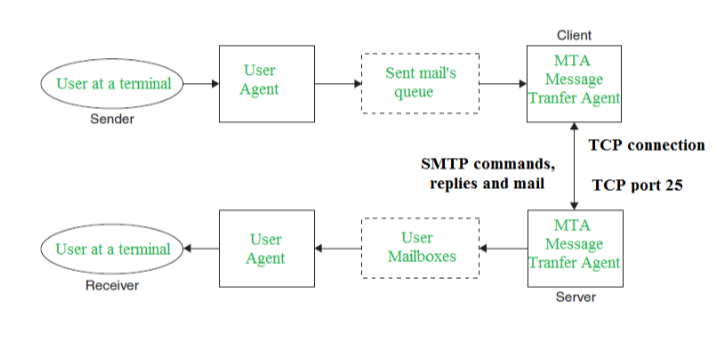
Both the SMTP-client and MSTP-server should have 2 components:
- User agent (UA)
- Local MTA
Communication between sender and the receiver : The senders, user agent prepare the message and send it to the MTA. The MTA functioning is to transfer the mail across the network to the receivers MTA. To send mail, a system must have the client MTA, and to receive mail, a system must have a server MTA.
SENDING EMAIL: Mail is sent by a series of request and response messages between the client and a server. The message which is sent across consists of a header and the body. A null line is used to terminate the mail header. Everything which is after the null line is considered as the body of the message which is a sequence of ASCII characters. The message body contains the actual information read by the receipt.
RECEIVING EMAIL: The user agent at the server-side checks the mailboxes at a particular time of intervals. If any information is received it informs the user about the mail. When the user tries to read the mail it displays a list of emails with a short description of each mail in the mailbox. By selecting any of the mail user can view its contents on the terminal.
- Some SMTP Commands:
- HELO - Identifies the client to the server, fully qualified domain name, only sent once per session
- MAIL - Initiate a message transfer, fully qualified domain of originator
- RCPT - Follows MAIL, identifies an addressee, typically the fully qualified name of the addressee and for multiple addressees use one RCPT for each addressee
- DATA - send data line by line
In address bar of a browser, have you noticed either http:// or https:// at the time of browsing a website? If neither of these are present then most likely, it’s http:// Let's find out the difference...
In short, both of these are protocols using which the information of a particular website is exchanged between Web Server and Web Browser. But what’s difference between these two? Well, extra s is present in https and that makes it secure! What a difference :) A very short and concise difference between http and https is that https is much more secure compared to http.
Let us dig a little more.
HyperText Transfer Protocol (HTTP is a protocol using which hypertext is transferred over the Web. Due to its simplicity, http has been the most widely used protocol for data transfer over the Web but the data (i.e. hypertext) exchanged using http isn’t as secure as we would like it to be. In fact, hyper-text exchanged using http goes as plain text i.e. anyone between the browser and server can read it relatively easy if one intercepts this exchange of data. But why do we need this security over the Web? Think of ‘Online shopping’ at Amazon or Flipkart. You might have noticed that as soon as we click on the Check-out on these online shopping portals, the address bar gets changed to use https. This is done so that the subsequent data transfer (i.e. financial transaction etc.) is made secure. And that’s why https was introduced so that a secure session is a setup first between Server and Browser. In fact, cryptographic protocols such as SSL and/or TLS turn http into https i.e. https = http + cryptographic protocols. Also, to achieve this security in https, Public Key Infrastructure (PKI) is used because public keys can be used by several Web Browsers while private key can be used by the Web Server of that particular website. The distribution of these public keys is done via Certificates which are maintained by the Browser. You can check these certificates in your browser settings. We’ll detail out this setting up secure session procedure in another post.
Also, another syntactic difference between http and https is that http uses default port 80 while https uses default port 443. But it should be noted that this security in https is achieved at the cost of processing time because Web Server and Web Browser needs to exchange encryption keys using Certificates before actual data can be transferred. Basically, setting up of a secure session is done before the actual hypertext exchange between server and browser.
Differences between HTTP and HTTPS
- In HTTP, URL begins with “http://” whereas URL starts with “https://”
- HTTP uses port number 80 for communication and HTTPS uses 443
- HTTP is considered to be unsecure and HTTPS is secure
- HTTP Works at Application Layer and HTTPS works at Transport Layer
- In HTTP, Encryption is absent and Encryption is present in HTTPS as discussed above
- HTTP does not require any certificates and HTTPS needs SSL Certificates
Features of Computer ports:
- We can connect external devices to the computer with the help of ports and cables.
- These are basically slots on mother board where we connect external devices or we can plugged in external devices through cables.
- Mouse, keyboards, printers, speakers are some of the example of external devices that connected to the computer through ports.
- TELNET: Port number of telnet is 23.
- FTP: Port number for FTP is 20 for data and 21 for control.
- TFTP: Port number of TFTP is 69.
- SMTP: Port number of TFTP is 25.
- LPD: Port number of TFTP is 545.
- SNMP: Port number of TFTP is 61(TCP) and 62(UDP).
- DNS: Port number of TFTP is 53.
- DHCP: Port number of TFTP is 67(TCP) and 68(UDP).
How to prevent SYN DDoS attack?
Preventing DDoS attack is harder than DoS attacks because the traffic comes from multiple sources and it becomes difficult to actually separate malicious hosts from the non-malicious hosts. Some of the mitigation techniques that can be used are:
- Blackhole routing -
In blackhole routing, the network traffic is directed to a 'black hole'. In this, both the malicious traffic and non-malicious traffic gets lost in the black hole. This countermeasure is useful when the server is experiencing DDoS attack and all the traffic is diverted for the upkeep of the network.
- Rate limiting
Rate limiting involves controlling the rate of traffic that is sent or received by a network interface. It is efficient in reducing the pace of web scrapers as well as brute-force login efforts. But, just rate limiting is unlikely to prevent compound DDoS attacks.
- Blacklisting / whitelisting -
Blacklisting is the mechanism of blocking the IP addresses, URLs, domains names etc. mentioned in the list and allowing traffic from all other sources. On the other hand, whitelisting refers to a mechanism of allowing all the IP addresses, URLs, domain names etc. mentioned in the list and denying all other sources the access to the resources of the network.